





Blog
Features
Display Info
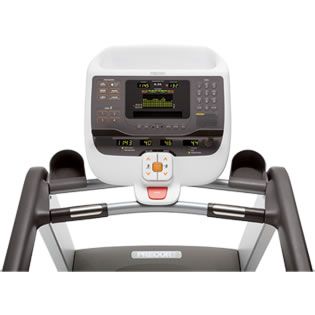
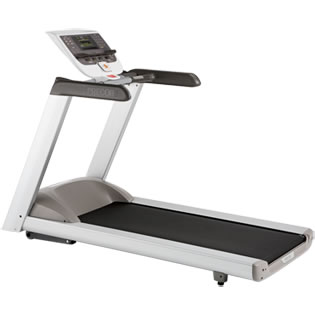
There are 3 displays that help you follow your performance and track your results. They are also very user friendly and easy to control.
There is the Upper Display, the Centre Display and the Lower Display. The Upper Display offers information on the approximate number of burned calories, program profile during an exercise session and heart rate.
The Center Display offers the program name when a program is selected. During exercises, this display becomes a message bar. It can also show other information according to your selections. To receive extra information, you need to press Metrics and % Complete will appear. Press Metrics or use the navigational arrow keys to surf through all available displays. Press OK when you are done.
The Lower display contains 4 windows, of which the two windows in the center cover the incline and speed information.
The console can offer feedback on average heart rate, average speed, calories, calories per hour, calories per minute, distance, finish time, goal, heart rate, incline and decline, METs, pace, % complete, personal best record, segment time, profile, speed, time, time elapsed, time in heart rate zone and time remaining.
You can personalize your workouts by creating a user profile. And another great thing is that you can insert age, weight and gender information so that your profile is complete.
Heart Rate Readings
You can either use the chest strap or the touch-sensitive handrail grips. After ending your workout, the treadmill offers a heart rate analysis.
Workouts
There are 23 programs available with the Precor 9.35, of which 1 mile, 10K, 2 mile, 5K, 2 Custom programs, Fitness test, 2 Goal programs, 5 Heart rate programs, 4 Interval programs, Manual, Random, Track, Walk and Weight Loss.
To get to the program list, press one of the Programs keys. Make your choice and press OK. Enter time, distance or goal and then age, weight and gender values. Use speed arrow keys to increase and decrease the speed of the running belt. Select your user profile prior to starting the workout.
Before exercising, you can set display preferences. Choose between U.S. or Metric units and enable or disable the safety code. It’s recommended to include a cool-down segment after workout. When the cool-down segments ends, the belt stops and you get the workout summary.
After you start working out, a flashing column will indicate your position as you exercise. Go to Options to make your safety code settings and to choose your unit of measurement. For the SmartRate feature, you must specify your age and also you must be wearing the chest strap or grasping the handrails.
Choose the unlimited time setting for indefinite exercises. Every time you end a calorie goal, time or distance workout, a cool-down session will begin.
Keep in mind that you can only make time settings for Custom programs. You can’t set distances or calorie goals. Also, you must include on your own a cool-down session, since they don’t incorporate it by default.
You can choose another program in the middle of the present session by going to Programs and choosing a new program, except when your present workout is a Fitness Test or a Heart Rate program.
Remember that Precor 9.35 allows you to record your personal best time, change workout time, adjust program goals and change your workout display options. You can also change units of measurement, adjust your
target heart rate, change safety code protection, set your pace and use the pacer feature with your personal best record.